Friday, 28 December 2012

Cloud Computing

Cloud Computing "C2" ;-
Cloud Architecture or Engineering which is popularly known to be Cloud Computing is majorly embraced by today's large Enterprises like Google, Amazon(EC2), Stackato, HP(which stepped up recently) and others. Cloud Computing which involves the use of Networked Computing Resources that are delivered or accessed as a service over a network, mostly a large and extensive network especially the Internet. The Cloud Computing has some features like Autonomic Computing, P2P Computing, Utility Computing, Client-Server Model, Extremely High-Processing Power Computers e.g., Mainframe Computers, Grid Computing. The "Cloud" name comes from the Highly Complex Architecture employed on the Servers that enables a variety of devices to use the Cloud Services that are usually abbreviated with an "aaS".
  • Infrastructure as a service (IaaS)
  • Platform as a service (PaaS)
  • Software as a service (SaaS)
  • Network as a service (NaaS)
  • Storage as a service (STaaS)
  • Security as a service (SECaaS)
  • Data as a service (DaaS)
  • Database as a service (DBaaS)
  • Test environment as a service (TEaaS)
  • Desktop virtualization
  • API as a service (APIaaS)
  • Backend as a service (BaaS)

PHP


PHP acronym  meaning Personal Home Page Tools changed to PHP: Hypertext Preprocessor in 1997, it was designed by Rasmus Lerdorf using C programming language in 1995. PHP is a more of a server-side scripting language than programming language because of it's weakly typed syntax and limited capabilities to system resources, designed for web development to develop web portals, applications and CMS(Content Management System). It has evolved over the years now has a CLI(Command Line Interface) and GUI-based capability to produce stand-alone GUI applications. Major softwares designed using PHP include Content Management Systems like, Joomla, Drupal, Wordpress, WikiMedia, etc. Current version of PHP is PHP 5.5.0 alpha released on November 2012, of which PHP 6 is yet to be released probably next year which is not known.

Java Enterprise Edition


Java Standard Edition acts as a core of Java's other editions, that is, Java EE, Java ME, Java FX, Java Card and PersonalJava. Java Enterprise Edition was added to give Java Technology an extended capability of distributed and multi-tier architectures, and web services that provides an extensive API to develop an enterprise applications, Large-scale software that includes network and web services that are robust, reliable, scalable, flexible, and highly secure to the desired industry standards. The Java EE platform has evolved over the years, currently known as Java EE 6(Java Enterprise Edition 6), Java EE 7 is the latest release.
  • J2EE 1.2(Dec 12, 1999)
  • J2EE 1.3(Sep 24, 2001)
  • J2EE 1.4(Nov 11, 2003)
  • Java EE 5(May 11, 2006)
  • Java EE 6(Dec 10, 2009)
  • Java EE 7(May 28, 2013) under JSR 342
 There are many application servers that support and can run Java Web or Enterprise Applications, but the preferred and recommended application server would be Glassfish Server Open Source Edition, current version v3. Java EE 6 is rich full of libraries and frameworks that has proved development to be quite of high complexities and this has been quite challenging for junior developers like me. I didn't mention about java-based build tool Ant which is proved to be very important for Web or Enterprise Application development. Java EE 6 which is multi-tier has the Client-tier(runs on Client's machine), Web-tier(runs on Web Server), Bussiness-tier(runs on Web Server), and the Enterprise-tier(runs on Database Server).

Thursday, 22 November 2012

Python GUI Snippet

An example of a Hello World GUI snippet using Python programming language;-

#! /usr/local/bin/python
from Tkinter import *
root = Tk()
w = Label(root, text="Hello, World!\n")
w.pack()
root.mainloop()


Screenshots


Friday, 9 November 2012

Towers of Hanoi


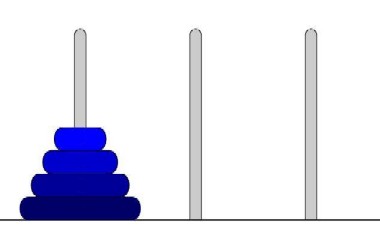
The Towers of Hanoi is one of the classic problem every budding computer scientist must grapple with. Legend has it that in a temple in the Far East, priests are attempting to move a stack of golden disks from one diamond peg to another. The initial stack has 64 disks threaded onto one peg and prearranged from bottom to top by decreasing size. The priests are attempting to move the stack from one peg to another under the constraints that exactly one disk is moved at a time and at no time may a larger disk be placed above a smaller disk. Three pegs are provided, one being used for temporarily holding disks. Supposedly, the world will end when the priests complete their task.


Friday, 31 August 2012

First C/C++ Executable or Binary File

If your C/C++ configuration is okay you can be able to create an executable file with any kind of a normal text editor e.g., notepad if you're using windows. An executable file is also a binary file in other words.For your information you do not need any specialized editor to do this.

Let's do an example;
  1. Open your text editor i.e., notepad and type the following code;
             #include <iostream>
             #include <string>
             using namespace std;

             int main(){
             string n ("User");
             cout << "Enter your name: ";
             getline(cin, n);
             cout << "\nWelcome to C++ programming, " << n << "!\n" << endl;

             return 0;}

     2.  Save this file as Hello.cpp or Hello.cc on your desktop (Note: It should not have any other extension).
     3.  Go to your shell or command prompt and change directory to desktop, e.g.,
           cd  C:\Users\RAWG\Desktop
    4.   Type the following;
           c++ Hello.cpp                   {to compile c++}
    5.    An executable will be created on your desktop "a.exe".
    6.    On your command prompt or shell type the file's name "a" i.e., a.exe.
    7.    It should ask for your name then display "Welcome to C++ programming, <name>!".
    8.    Do the same process for a C executable save it as "Hello.c".
           Here is the code for a C executable;
            #include <stdio.h>

            int main(void )
           {
            printf("Welcome to C programming!\n" );
            return 0;}
   9. On any other platform go to your shell and use your OS editor follow the instructions as above.


Sunday, 26 August 2012

C/C++ Configuration

How to Configure C/C++ configuration on Debian 6;
  •  Download the respective GNU Linux c/c++ compiler archives namely,  gcc-core-3.4.5 and gcc-g++-3.4.5
  • Go to your shell or terminal and you'll need to a super user or root to install this.
  • On the terminal change directory to where the repositories or archives are located.
  • Type on the terminal cd <directory of archives> i.e., cd /home/rawg/Desktop 
  • Install using the following commands  apt-get install gcc-core and apt-get install gcc-g++ to install both C and C++ compilers.
To test if am right type c++ --version on the terminal  you should see your version of the compiler if it is successful.

On windows;
  1. First you need to be connected to the Internet 
  2. Download GNU's compilers either cygwin or mingw.
  3. Install one compiler
  4. Go to the installation directory of the compiler e.g., C:\MinGw\bin
  5. You'll need to copy the bin directory to your Path as I have done for Java compiler.
  6. Follow the same steps as the  Java configuration